BLUF
I took over the Prenatal Visits project in its early phases when the workflow lacked clarity, consistency, and a feasible direction. I redesigned the core experience by restructuring the Card View, rebuilding the flowsheet, and introducing interaction patterns that matched clinical decision-making.
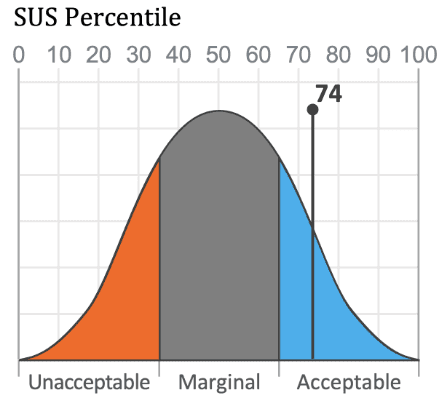
I strengthened trend visibility and created scalable components that aligned with engineering constraints and future product needs. Usability testing reflected strong performance with a 74 percent SUS score and measurable improvements in task efficiency. The redesign was completed and prepared for implementation as a stable and scalable clinical workflow.
Situation
The Prenatal Visits project was one of the most complex assignments I handled in clinician-facing workflows. The challenge came from both the clinical domain and the timing of when the project reached me.
The original designer had already produced around than three iterations of the Card View. The client continued to raise concerns, engineering faced technical obstacles, and no design direction had managed to balance usability, clarity, and feasibility. The team was stalled.
During this period, my colleague transitioned out of the company and handed the project to me along with a forty page requirement document from the client. This document contained dense and technically demanding requests. The three most significant requirements were:
• A complete uplift of the outdated component design to match newer standards.
• Integration of new data types into the visit information model, expanding what needed to be presented.
• A new data input and trend viewing capability through a side panel that supported future scalability.
Earlier solutions had layered new patterns on top of old ones, creating visual clutter and cognitive load. Engineering struggled to implement several ideas because of architectural constraints. Clinicians also faced friction. They needed to interpret values, compare historical data, and update records quickly, but the existing design slowed them down.
The project required a fresh perspective, clear prioritization, and the ability to bring together clinical needs, design logic, and technical constraints. My responsibility was to take ownership, understand the problems at their root, and design a workflow that could move forward.
Task
My task went beyond visual adjustments. It required structural and interaction level changes across the workflow. I needed to:
• Understand and reorganize complex clinical workflows
The workflow contained conditional paths and varied use cases depending on visit number, risk category, and medical history.
• Uplift the visual and functional consistency of the module
The interface needed to align with updated component guidelines.
• Simplify and clarify the Card View interaction model
The existing Card View relied on hover interactions, lacked structure, and forced clinicians to work across scattered information.
• Create scalable interaction patterns
The client needed patterns that could extend into other clinical modules, not just prenatal care.
• Redesign the flowsheet for data manipulation
The flowsheet needed to support add, edit, and remove actions without breaking clinical focus.
• Improve trend visibility
Clinicians needed a fast way to inspect longitudinal data without opening multiple panels.
• Align feasibility across teams
Engineering constraints were strict, so I needed to collaborate closely with developers, product managers, and the client to create realistic, implementable solutions.
Action
Screenshots from Older Design
Card View
The card view consists of a Timeline with the Visit dates and corresponding card with the documented information.
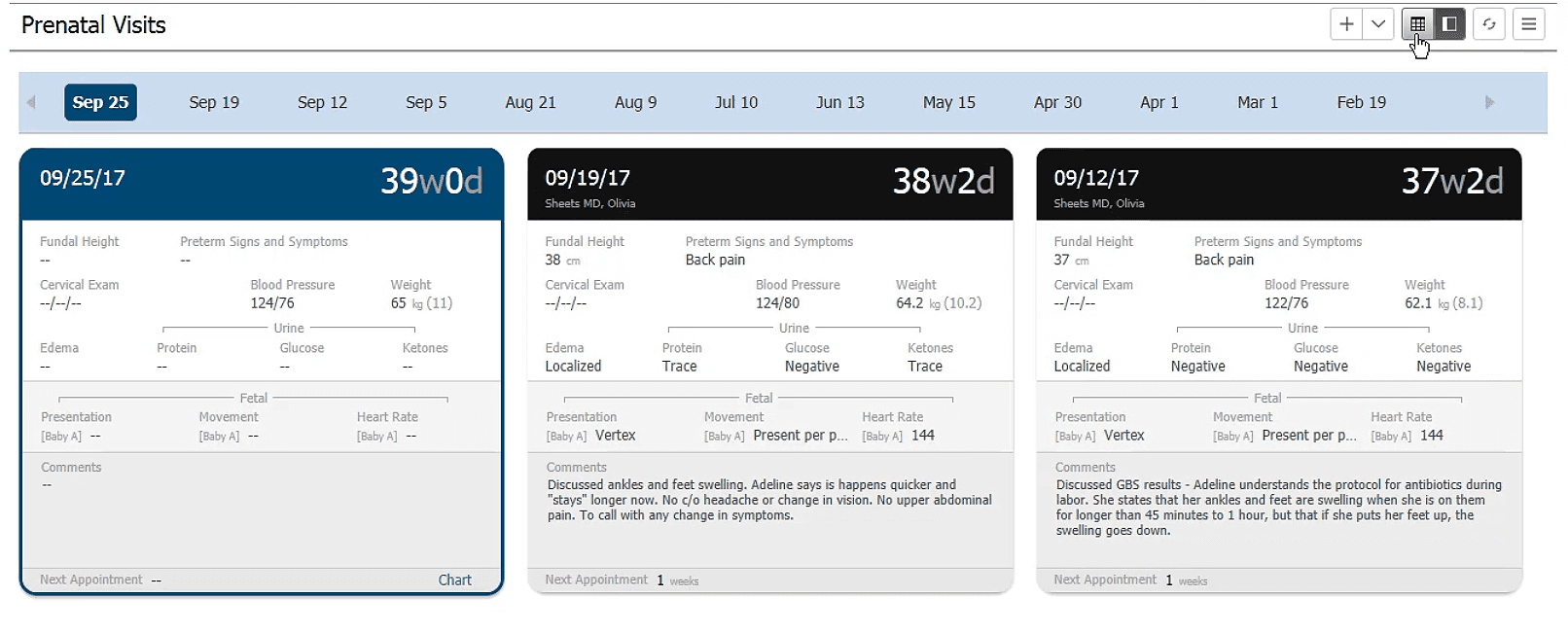
Timeline - Card View
The timeline had two buttons to scroll through the timestamps in the timeline

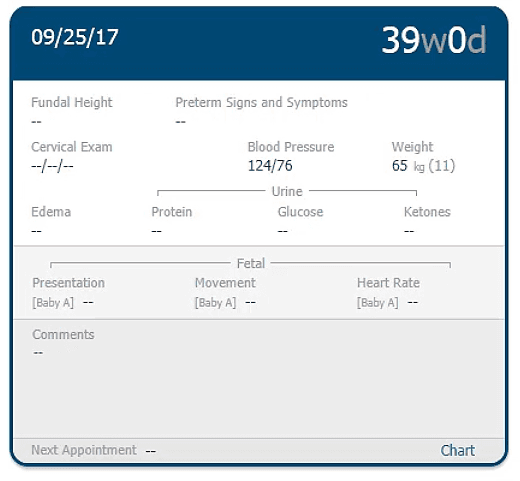
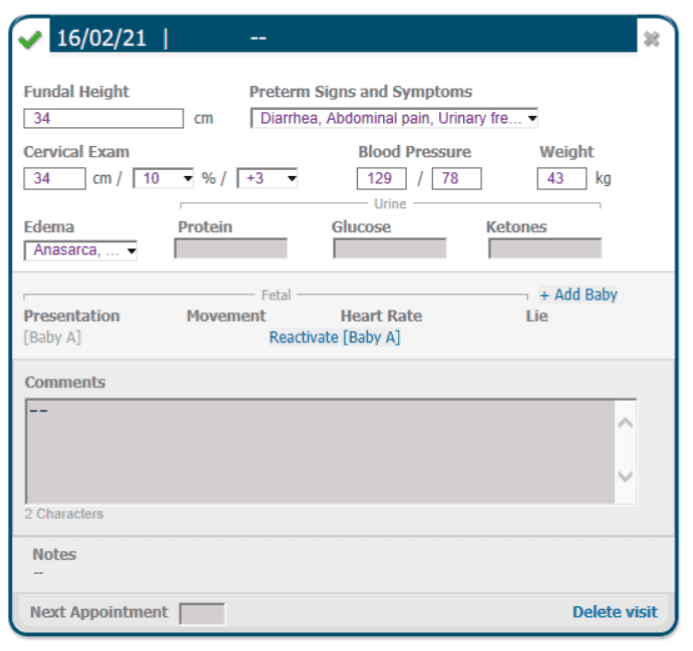
Editing Card - Card view
Flowsheet View
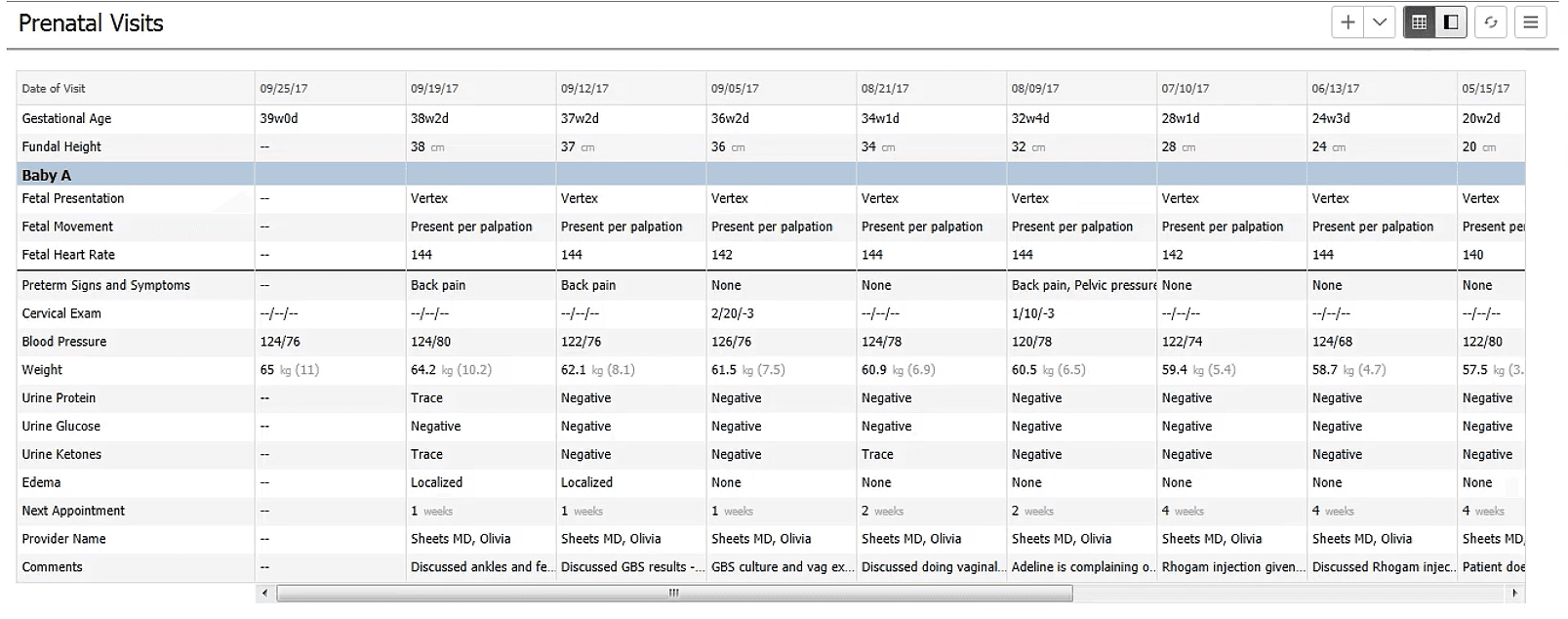
The Flowsheet view is a tabular representation of the tabular view of the same data
My approach to the Prenatal Visits redesign was guided by three principles:
clarity, scalability, and clinical empathy.
1. Deep Dive into Requirements and Existing Designs
The first step was to gain complete clarity. I spent the initial days studying the entire set of requirements from the stakeholders. I also reviewed every design iteration created earlier to understand the evolution of the solution and the points of friction.
This helped me identify three core issues:
• The interaction model relied heavily on hover, which was unreliable and inconsistent as per Cerner Design Standards.
• Trend viewing was not intuitive and required repeated interactions.
• The workflow lacked clarity and did not support multiple data actions effectively causing users to navigate away from the component.
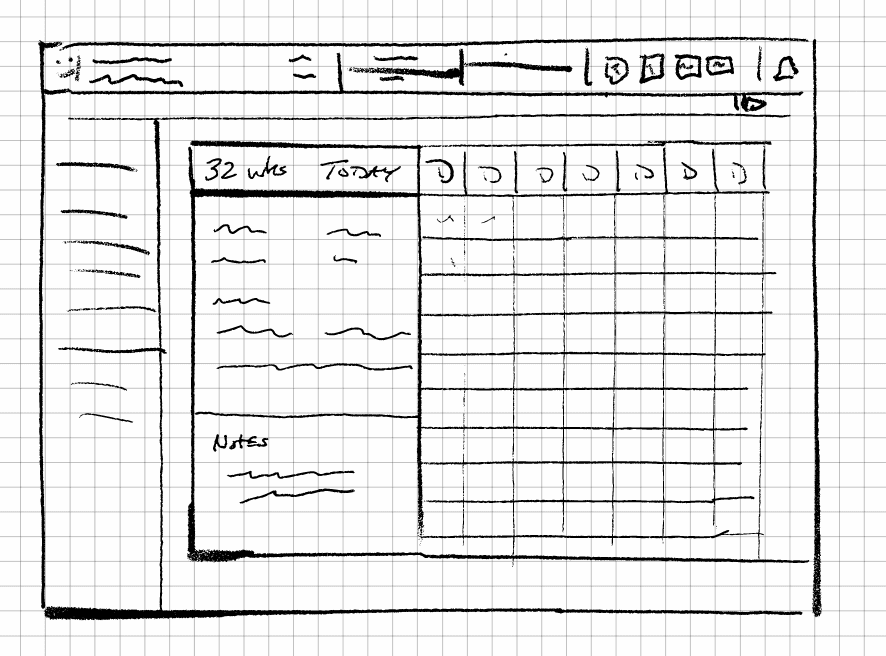
I turned these insights into a initial low fidelity prototype which I shared internally to set a baseline for the redesign.
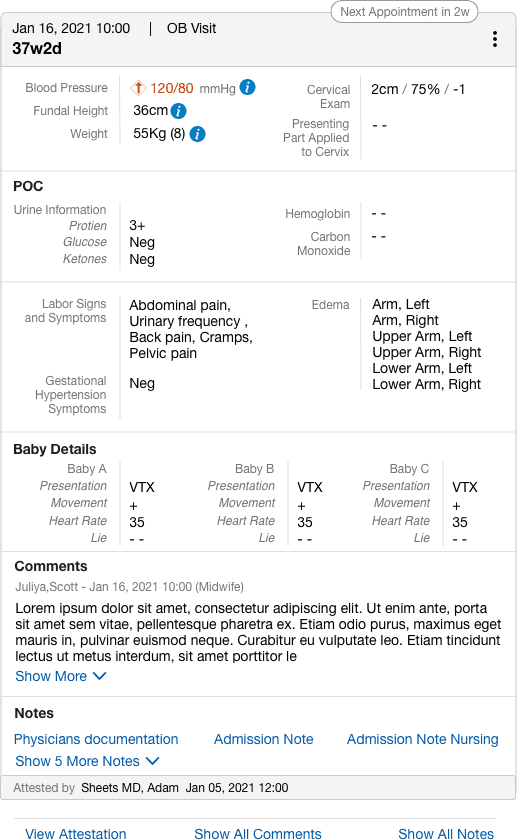
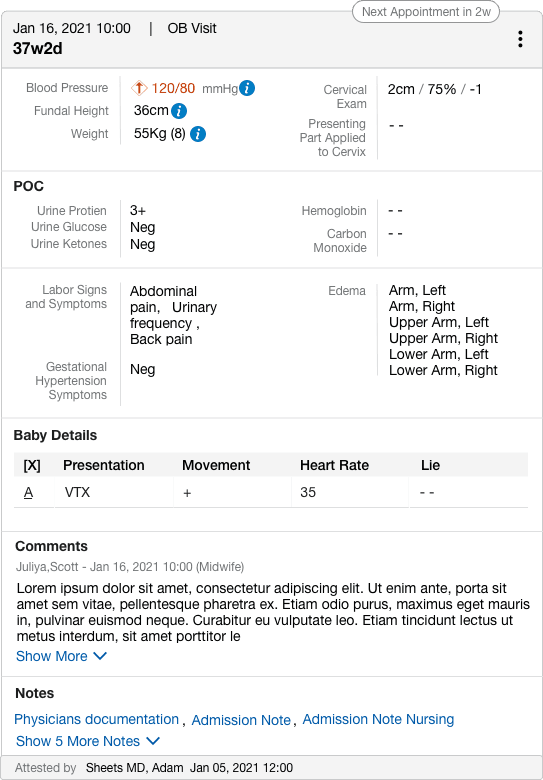
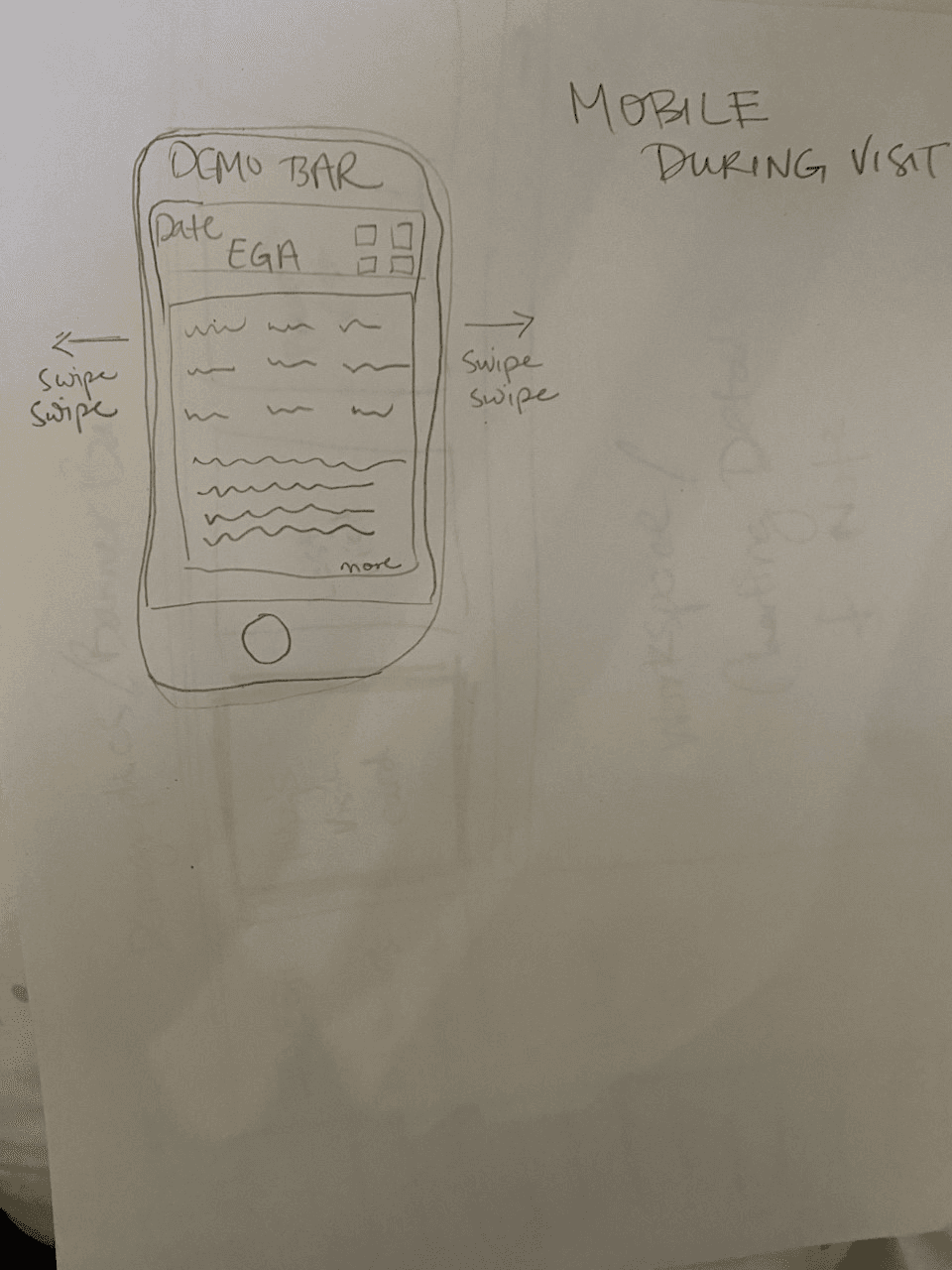
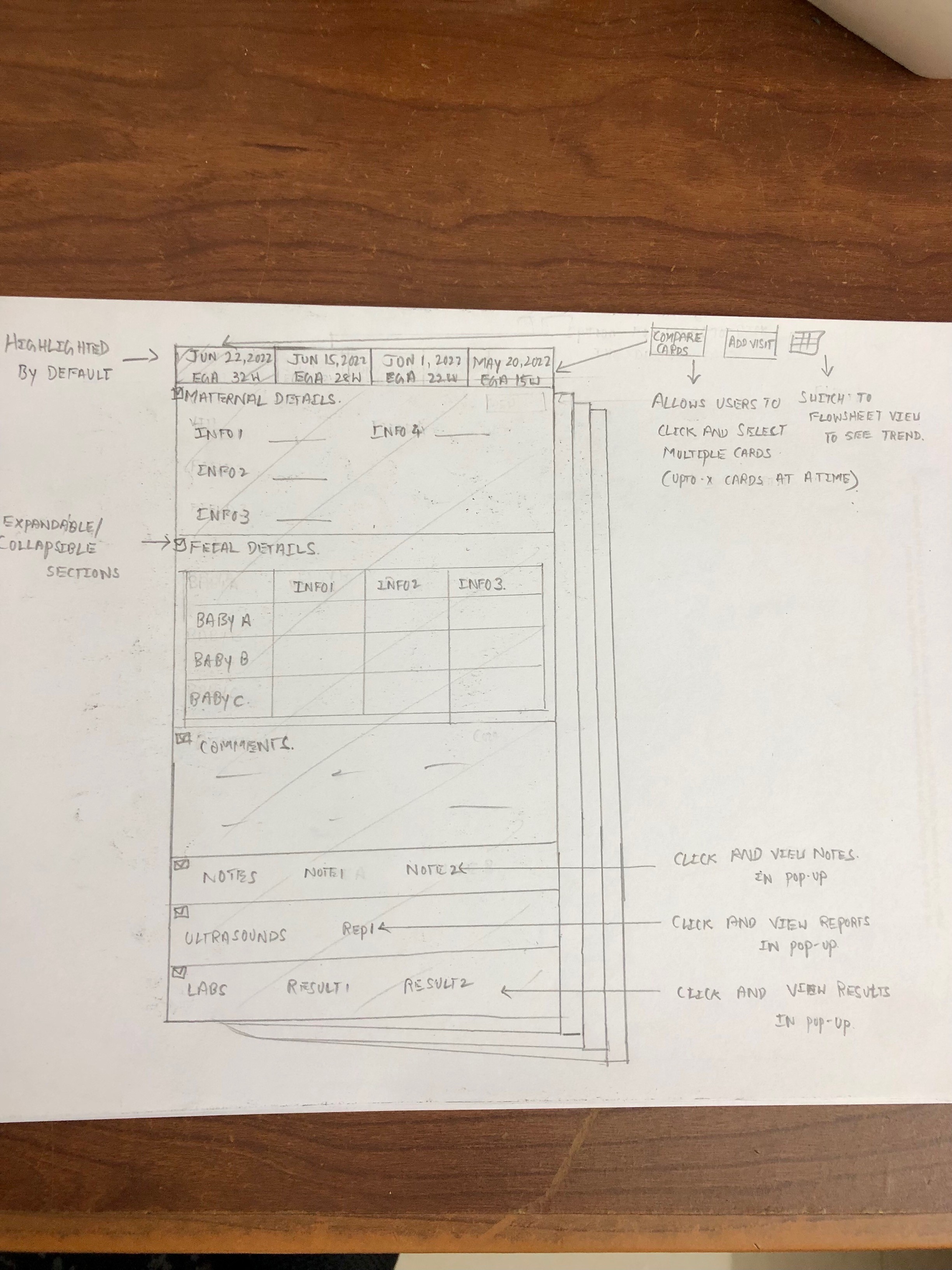
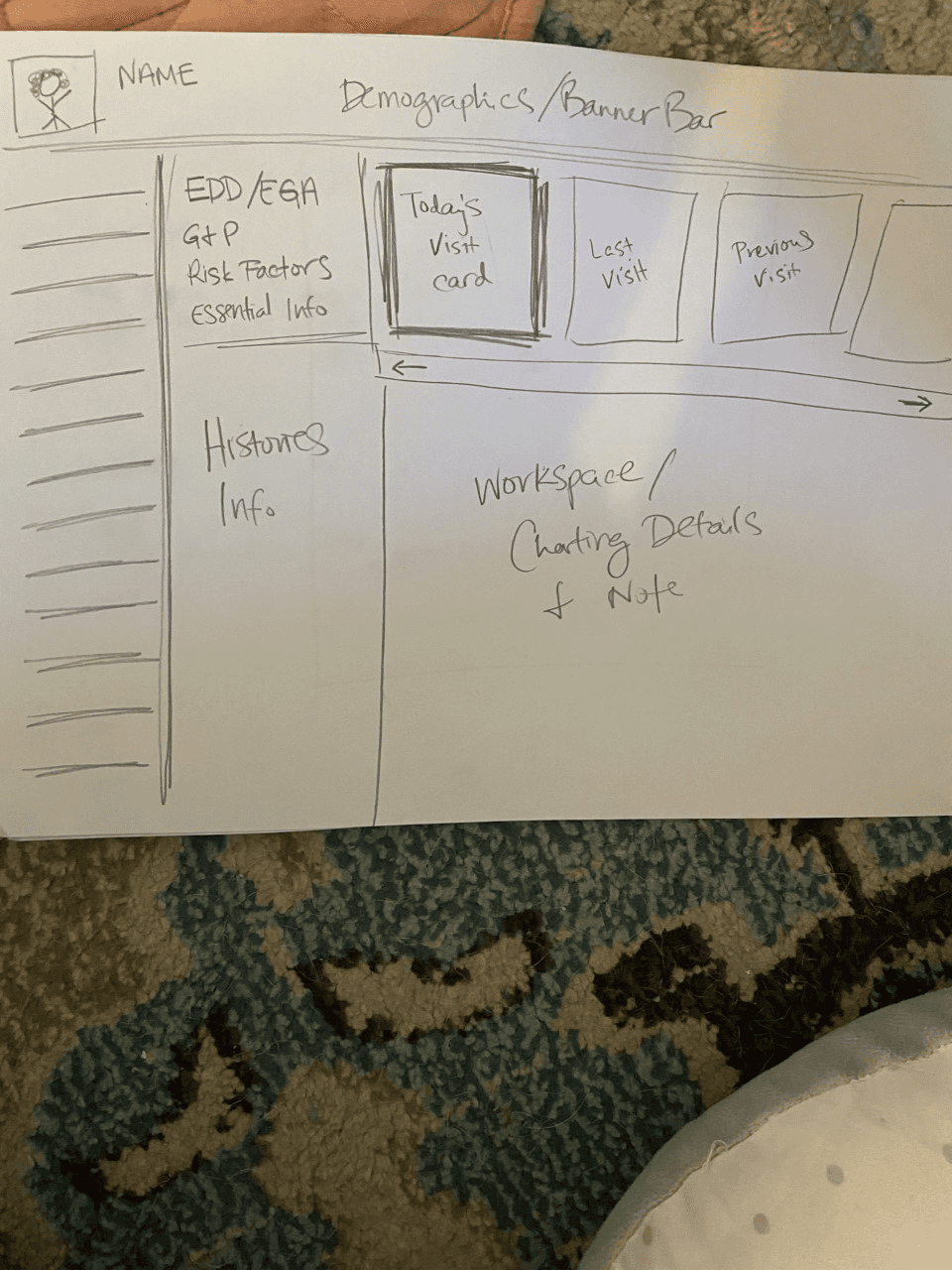
Iterations of Card Design
2. Restructuring the Card Interaction Model
The Card View was overloaded with information and required clinicians to hover to view trends. Hover interactions are not recommended for dense clinical workflows because users often switch devices and hovering is inconsistent across touch interfaces.
There were a lot of back and forth communications just to land on a scalable and modular design of the card which could be configured for different clinicians with different set of requirements for what data values should be displayed as per configuration.
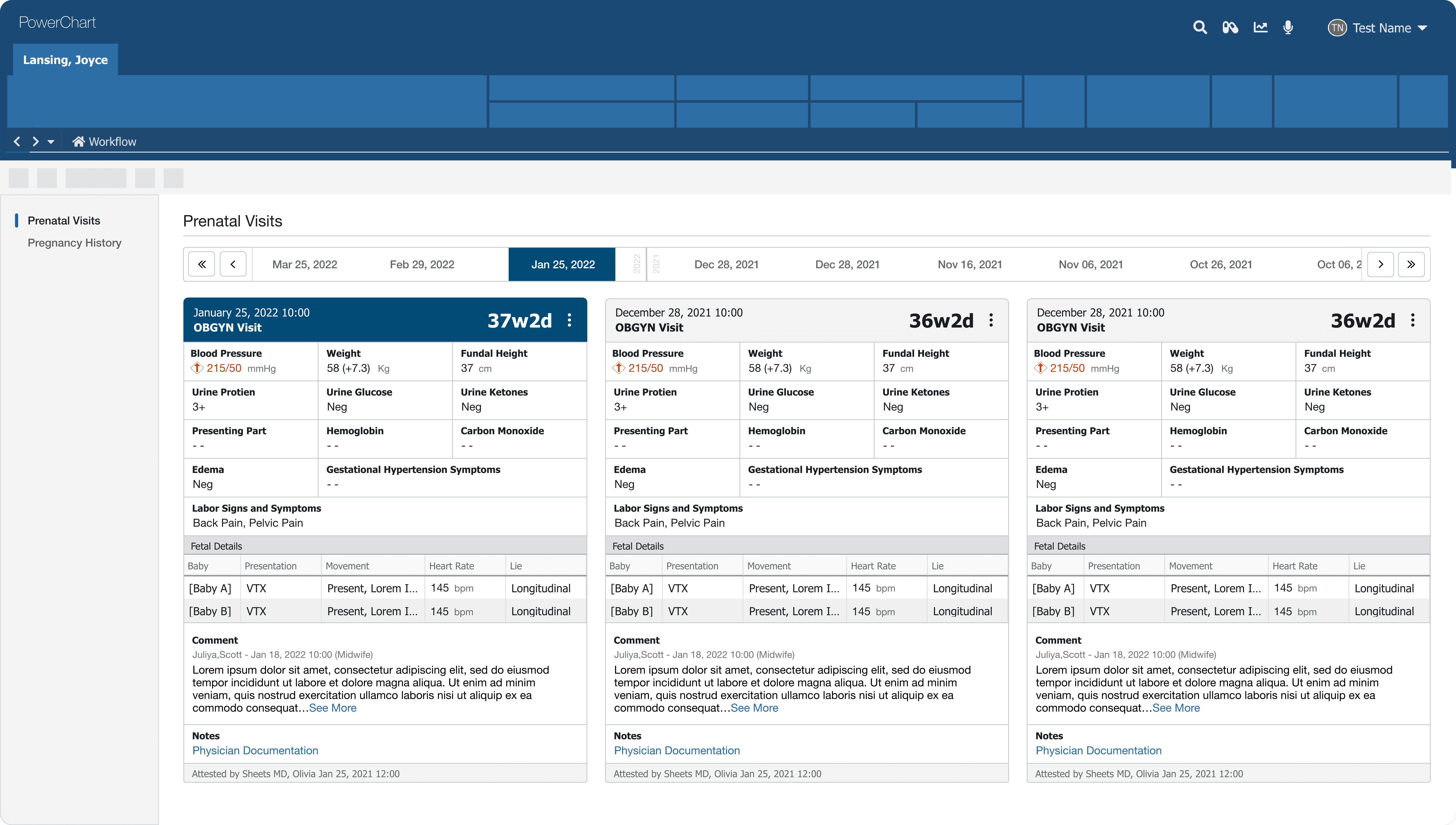
To address this, I introduced structured pop-over interactions. Instead of relying on hover, the user could click on the card to open a clean and consistent preview of important values. This change reduced ambiguity and aligned the interaction model with both future tablet use and general accessibility guidelines.
I also created a system where repeated interactions felt predictable. Each card carried consistent entry points for viewing, editing, or exploring trends.
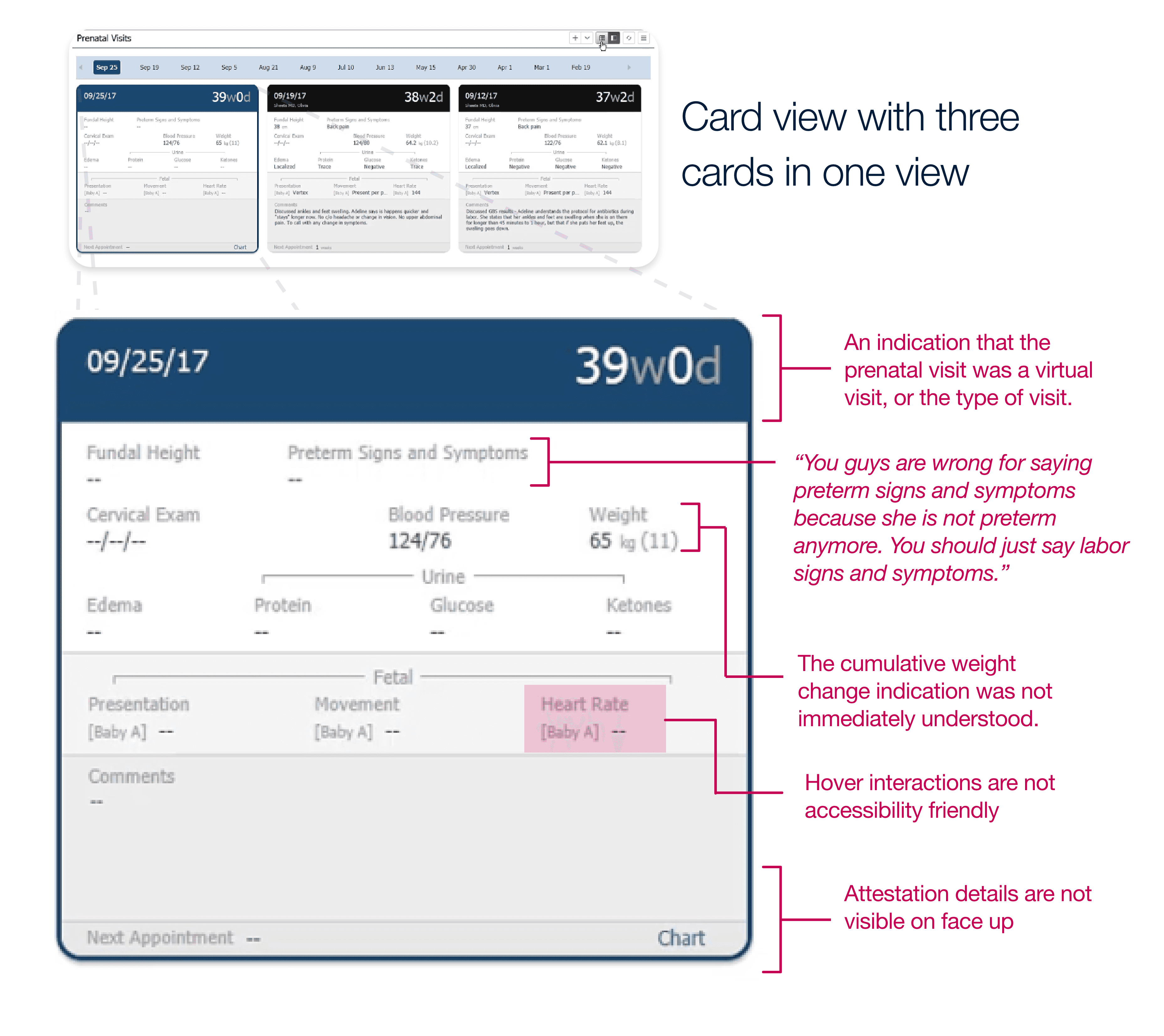
Old Card Design: Issues Identified
No clear visit type in the header
The nature of the visit (e.g., virtual, OB visit) was not immediately visible.
Hover-based interactions
Important data trends were only accessible via hover, causing accessibility problems.
Unclear cumulative weight indicator
The representation of weight change was confusing and not easily understood.
Hidden attestation details
Critical legal and clinical information was not visible upfront.
Lack of structure for fetal and comment data
Important fields like comments and fetal observations were not clearly emphasized.
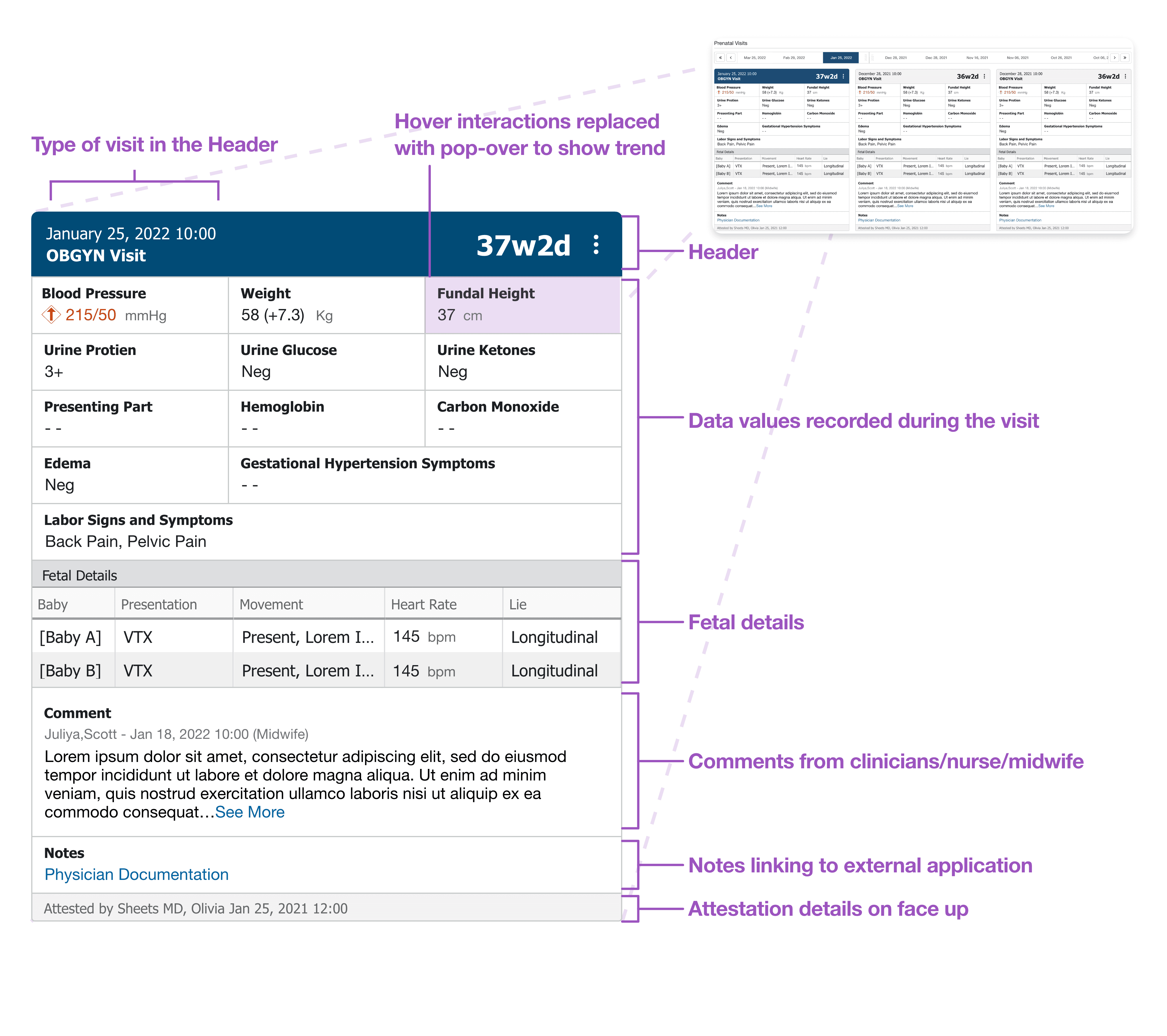
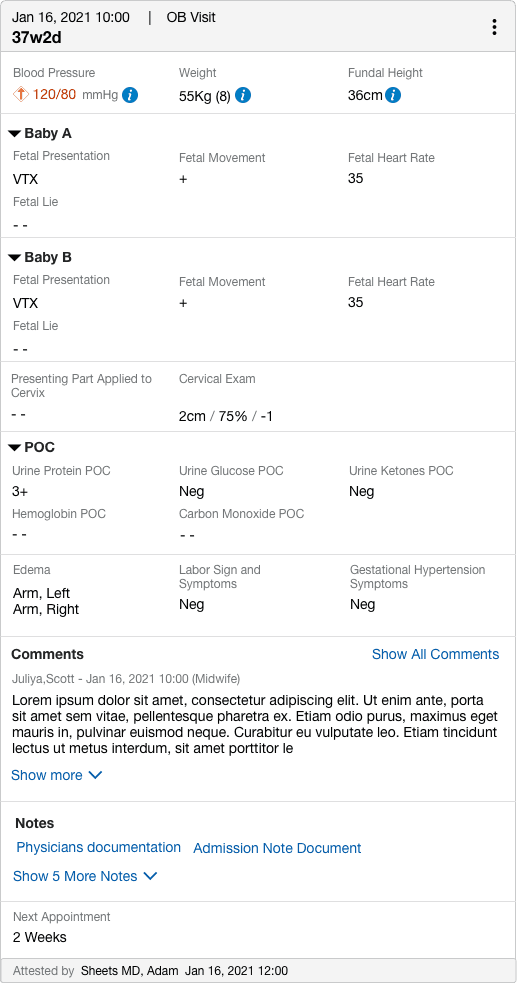
Uplifted Card Design: Improvements Made
Visit type displayed prominently in the header
Gave users immediate context of the visit type.
Replaced hover with accessible pop-over interactions
Allowed users to view trends more intuitively and inclusively.
Organized data into structured sections
Created logical groupings for vitals, fetal details, and comments.
Attestation information made visible
Increased clarity and compliance by surfacing important info directly on the card.
Integrated clinical comments and documentation links
Added contextual relevance and supported clinician communication.
Designed for scalability
Supported multi-baby pregnancies and modular growth.
Rebuilt the Flowsheet to Support Accurate Data Entry
Clinicians interacted with it to add, edit, or remove values that shaped the patient’s clinical record.
The original structure created confusion because:
• users relied on hovering the cells to view trend data.
• The user had to leave the component to edit values.
• Trend data was not visible at the point of interaction.
I redesigned the flowsheet so every cell acted as a reliable trigger for data actions. A side panel opened immediately on click, presenting options for add, edit, and remove.
I created a clear separation between historical data and upcoming entries. Trend information became visible directly with a click so clinicians could make informed decisions during data entry.
I also introduced a two-direction trend view:
• Row-level trends displayed value changes within a data category.
• Column-level trends displayed changes across visit moments.
This matched the mental models clinicians described during clarification sessions.
4. Introducing the Quick Access Feature
Clinicians often needed to jump quickly from one visit to another to identify trends or confirm values. The previous design required them to scroll up and down or open multiple windows. This slowed down analysis and increased cognitive load.
I conceptualized Quick Access, a feature that provided:
• Single-click navigation to any visit
• Immediate trend visibility
• A unified screen where clinicians could interpret longitudinal data without navigating away
This significantly reduced the number of steps required to view trends across visits. The UX was designed to be linear and predictable, which clinicians appreciated during testing. Although it was pushed back to next release due to timeline constraints.
5. Facilitated a Design Workshop to Align the Component System
I facilitated a design workshop after I had already spent 4 to 5 months working on the Prenatal Visits redesign. By that point, it was clear that the broader team did not share a consistent understanding of how the application should function. This misalignment affected interpretation of workflows, component choices, and development direction.
The workshop had two focused objectives:
• Create a shared understanding of the workflow and interaction logic
• Clarify why certain features required new component design instead of using pre-made elements from the UI library
I walked the team through the complete user journey, highlighted the gaps caused by earlier assumptions, and demonstrated where existing UI components were insufficient for clinical tasks. I explained the exact points where new patterns were necessary to support trend visibility, data accuracy, and scalable interactions.
The workshop aligned designers, developers, and project managers on a single direction. It eliminated conflicting interpretations, clarified component decisions, and ensured everyone understood the rationale behind creating new designs rather than relying on the existing library.
Result
2. Reduction in Navigation Steps
The new interaction model eliminated unnecessary movement across the interface.
The restructuring of the Card View and the consolidation of data actions in the flowsheet reduced trend-related navigation steps by 30 to 40 percent, based on internal task sequence analysis.
Clinicians reached the required information faster, and the workflow no longer forced them into repeated context switching.
3. Accurate and Context-Driven Data Entry
The redesigned flowsheet supported direct and precise data entry.
Each cell triggered a predictable set of actions, and the side panel presented trends, comments, and value history in one place. This eliminated the earlier ambiguity caused by hover-only interactions and off-screen edits.
Users executed add, edit, and remove actions within a single workflow and with complete context.
4. Unified Component Logic Across the Workflow
The structured pop-over pattern, the flowsheet interaction rules, and the navigation logic created a unified interaction model.
The workshop I facilitated aligned designers, developers, and project managers on the purpose and behavior of each component. This removed conflicting interpretations and reduced rework cycles.
The team adopted these patterns as the direction for upcoming clinical modules, which increased the long-term scalability of the product.
5. Completed Redesign Ready for Implementation
The full Prenatal Visits redesign was completed and prepared for implementation.
The final solution provided a stable architecture, consistent interaction patterns, and clear data presentation, resolving the complexity that had stalled earlier iterations.
Personal Explorations
In every project I work on, I aim to design the best possible solution that meets user needs, even if technical constraints prevent full implementation. These explorations serve as future design directions that teams can reference when timelines or technology allow.
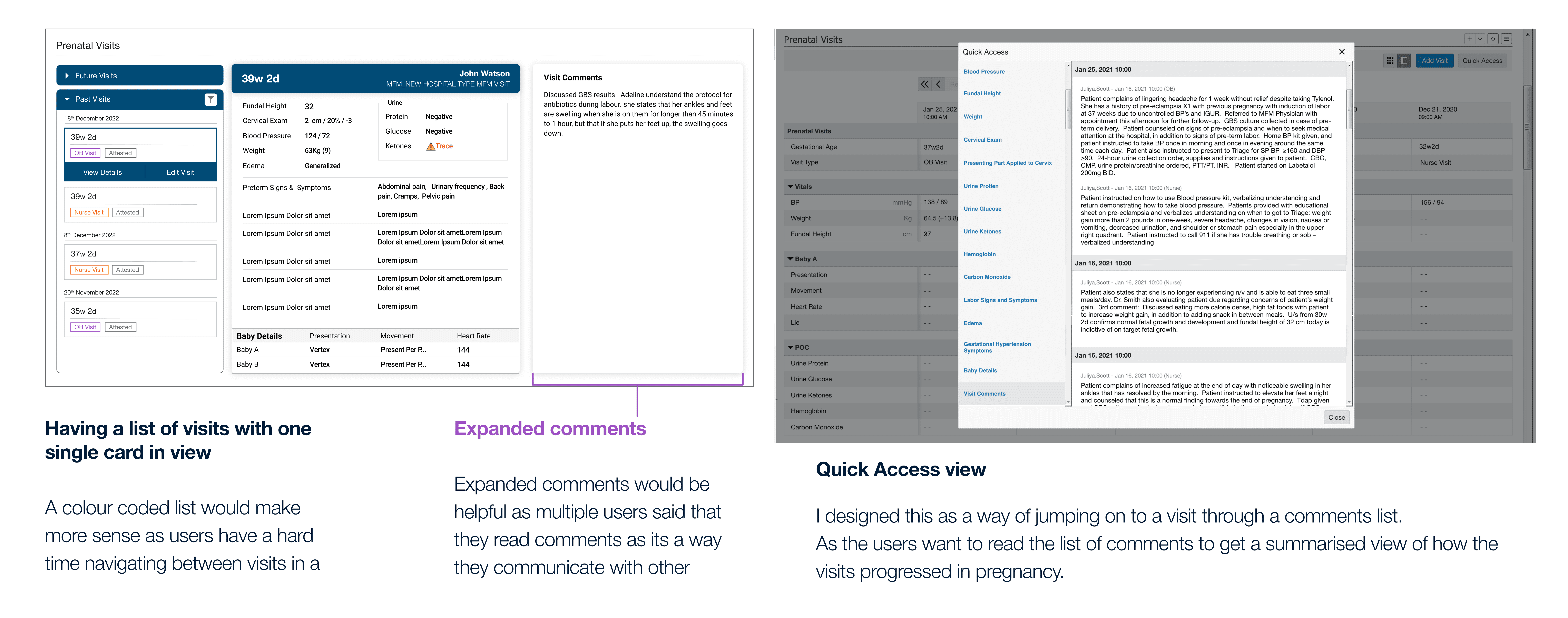
During the Prenatal Visits redesign, I identified that clinicians often struggled with navigating between multiple visit cards. Comments were especially important to them, as they relied on them to understand patient history and coordinate care across roles. Many users expressed the need to view all comments in one place, without having to click into each card individually.
To support this workflow, I explored several design directions:
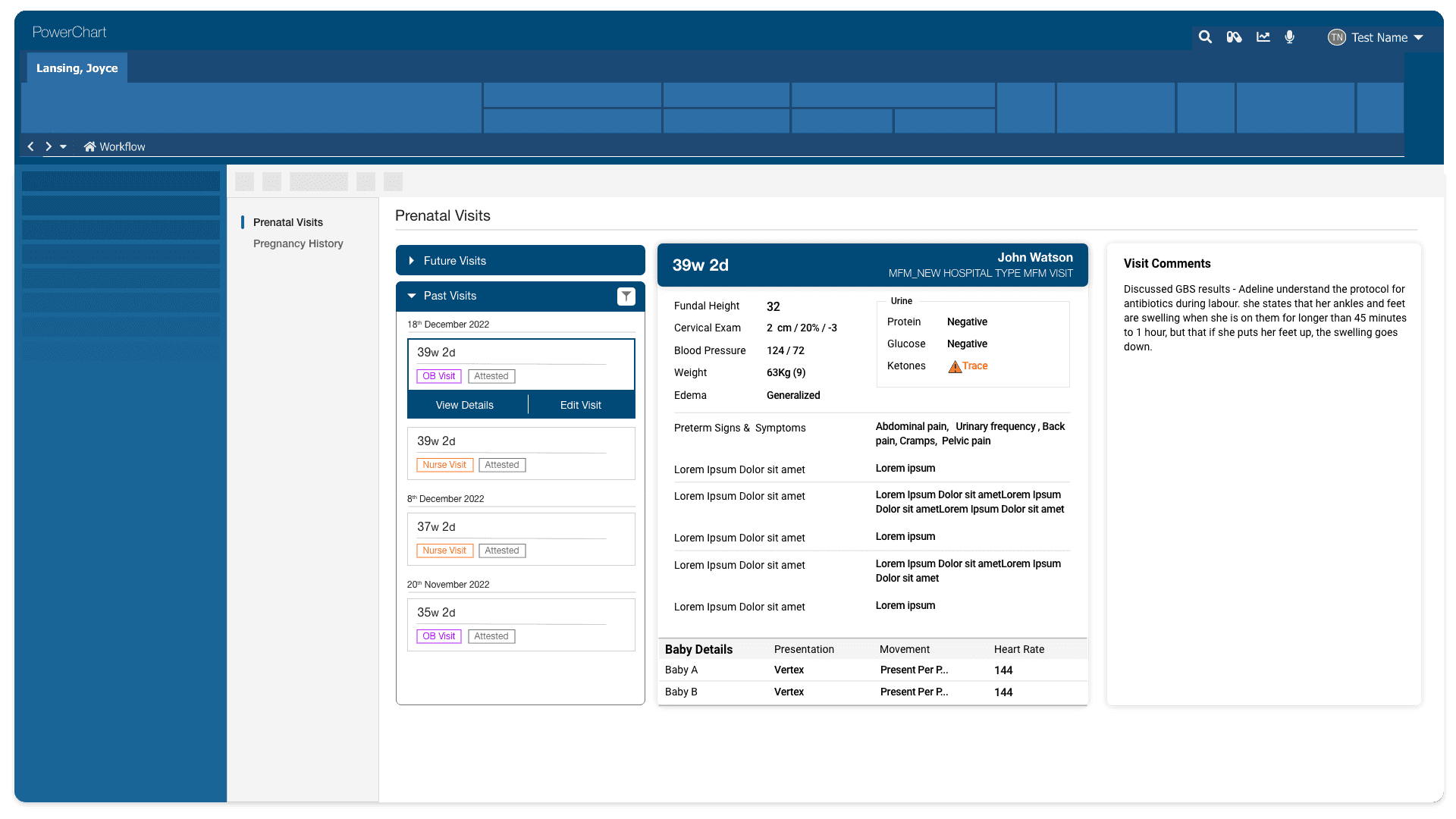
Single Card with List View
This concept showed one card at a time alongside a vertical list of visits. The list was color-coded to help users identify visit types quickly and navigate with less cognitive load.
Expanded Comments View
I designed a layout that emphasized comment visibility within the card. This helped clinicians focus on communication threads without losing context.
Quick Access View
This version surfaced all visit comments in a scrollable list, allowing clinicians to read through patient history and jump directly to any visit. It provided a summarized flow of events and was particularly helpful for understanding how a pregnancy progressed over time. This idea was well received by the client for its clarity and potential efficiency gains.
These concepts were designed with scalability in mind and aimed to enhance usability without compromising clinical workflows. Though not all of them made it to the final release, they represent directions the product could grow into based on real user needs.